
Description
Maestro 3D Ortho – Features / Capabilities
-
Study Models
Manages clinic, doctors, patients and cases via a database. Enables creation of virtual bases (ABO, ABO-2013, Ricketts, Parallel, Tweed) and addition to scanned models. Supports occlusal inspection, 2D / 3D cross-sections, measurements on teeth and full arches. -
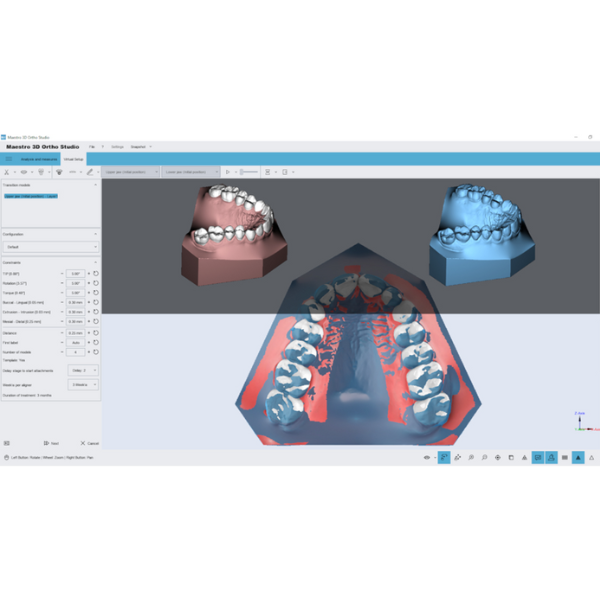
Virtual Setup
Move teeth in both arches, evaluating distances / contacts / intersections. Add and customize attachments / labels (positive or negative). Perform teeth extraction and IPR (interproximal reduction). -
Models Builder
Generates a series of 3D models needed for full orthodontic treatment, exportable as STL / PLY / OBJ. Users can set number of transition models, maximum movement along axes, maximum rotations. -
Cut & Close
Trim or remove superfluous geometry to save material and speed up printing. -
Brackets Placement
Automatically place brackets on teeth using various placement techniques (Step, Roth, Wick Alexander, Dwight, Damon, MBT, Andrews). In conjunction with the clear aligner module, build transfer trays (jigs) for bracket placement. -
Virtual Clear Aligner
Design and simulate clear aligners virtually. You can define aligner shape, variable thickness, perform thermoforming simulation, and generate bracket transfer trays (with or without jig) and guides for etching / attachment placement. -
Integration with CBCT (/ Real Roots)
Merge scanned crowns with roots from CBCT scans to get more accurate models. This enhances determination of tooth axes and root positions. -
PDF3D Reporting
Embed 3D models (movement overviews, details of virtual setup) into PDF reports for efficient sharing with clinicians.
Maestro 3D Ortho – Technical / Functional Specifications
| Parameter | Details / Functionality |
|---|---|
| Base Management | Clinic / doctors / patients / case database |
| Virtual Bases Supported | ABO, ABO-2013, Ricketts, Parallel, Tweed |
| Model Outputs | STL, PLY, OBJ |
| Transition Models | Customizable count, movement limits, rotation limits |
| Bracket Protocols Supported | Step, Roth, Wick Alexander, Dwight, Damon, MBT, Andrews |
| Clear Aligner Features | Shape definition, thickness variation, thermoforming simulation, bracket tray guide generation |
| CBCT Integration | Merge crown scans + real root data |
| Reporting | 3D model embedding within PDFs |

Reviews
There are no reviews yet.